Ever been deep into a game when your PS5 overheats, crashes, or shows a blank screen?
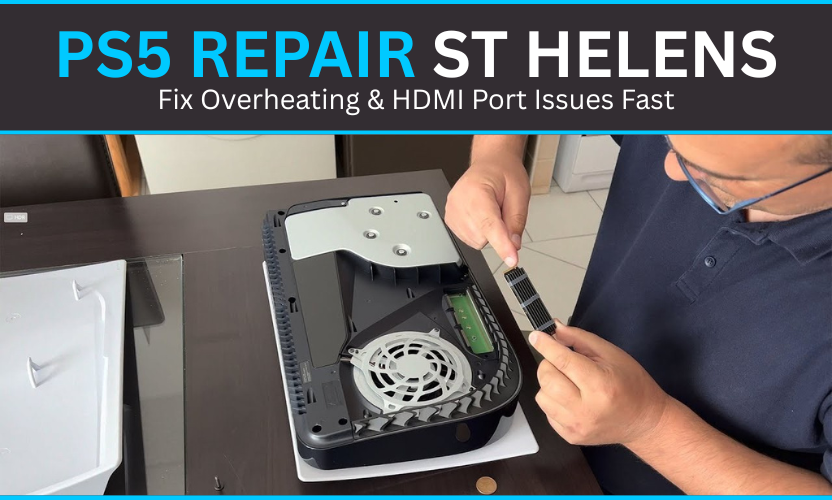
It’s frustrating, especially when it happens during a boss fight or an online match. At Gadgets N Repair St Helens, we understand how vital your console is to your gaming life. Our technicians specialize in PS5 repair, fixing HDMI port issues, and resolving overheating problems with speed, precision, and care so you can get back to playing fast.
Common PS5 Storage Problems and Overheating Issues
Why Your PS5 Slows Down Over Time
If your PS5 repair console storage seems sluggish, you’re not imagining it. When your internal drive gets overwhelmed or develops errors, games that once loaded in seconds can suddenly take minutes. Over time, this leads to a poor gaming experience with random crashes and even data loss.
When Overheating Becomes a Bigger Problem
The SSD in your console works harder than most people realize. Excessive heat and poor ventilation can cause overheating issues, forcing the system to slow down to protect itself. The result? Stuttering gameplay, failed system updates, and missing save files. At Gadgets N Repair St Helens, we’ve seen this hundreds of times and we know how to fix it fast.
PS5 Internal Drive Repair & Replacement in St Helens
Why DIY Repairs Can Be Risky
Many gamers try to fix their PS5 SSD at home and that’s where things often go wrong. The PS5 uses high-density connectors on the main circuit board, which can break easily without the proper tools or experience.
Professional Repair & Data Recovery
At Gadgets N Repair St Helens, we use specialized tools and manufacturer-grade components for every SSD replacement or data recovery job. Our process includes:
- Drive cloning to preserve your saved data and system setup.
- Thermal paste replacement to improve heat management.
- Cooling system testing to ensure long-term stability.
- High-quality SSDs that meet or exceed Sony’s original standards.
You’ll get your console back running smoothly with all your games, profiles, and settings right where you left them.

Quick PS5 Repair Guide – Common Issues & Fixes
| PS5 Repair Issue (Keyword) | Likely Cause | Gadgets N Repair Solution |
| PS5 Overheating | Dust, poor ventilation, or dried thermal paste | Deep cleaning & thermal paste replacement |
| HDMI Port Damage | Plug strain or impact damage | HDMI port replacement with genuine parts |
| Storage Corruption | Faulty SSD or file system errors | SSD replacement or data recovery |
| Slow Loading & Lag | Cache overload or corrupted files | Database rebuild & storage optimization |
Our PS5 repair process in St Helens covers all of the above with same-day turnaround for most issues.
External Storage & USB Port Fixes
Why External Storage Fails on PS5
Not all USB drives are fully compatible with the PS5. Some use more power than the console can supply, while others become unreliable due to USB port damage or data corruption. Common symptoms include:
- External drives disconnecting mid-use.
- File transfers failing or freezing.
- Games not launching from external storage.
How We Fix It at Gadgets N Repair
Our technicians check for USB port damage, power inconsistencies, and software conflicts. We also recommend and install PS5-certified external drives for better reliability. If the issue runs deeper, we’ll inspect the internal drive to ensure your console’s data flow remains smooth and uninterrupted.
Affordable PS5 Repair Costs in St Helens
Transparent, Honest Pricing
At Gadgets N Repair, we believe great service shouldn’t break the bank. Our PS5 repair costs depend on the issue minor cleaning or optimization services are quick and affordable, while SSD replacements, HDMI port repairs, or data recovery take a little longer and cost slightly more.
Why St Helens Gamers Trust Us
- Same-day repairs for most overheating or HDMI problems.
- Qualified, experienced technicians who genuinely care about gaming.
- No hidden fees.
- Only genuine parts used for every repair.
Your console deserves the same passion you bring to your games and at Gadgets N Repair St Helens, that’s exactly what we deliver.

FAQs – PS5 Repair & Maintenance by Gadgets N Repair St Helens
1. Why does my PS5 still overheat after cleaning?
Even after cleaning, overheating issues may continue if the thermal paste has dried out or the heatsink is clogged. Our team can reapply paste, clean internals, and restore proper airflow.
2. Can I fix the HDMI port myself?
DIY HDMI port repair is not recommended. It requires delicate soldering near the mainboard, and one mistake can cause more damage. Let Gadgets N Repair St Helens handle it safely.
3. How much does PS5 repair cost?
It depends on the issue. Cleaning and optimization are affordable, while SSD replacements and data recovery cost more. We always provide transparent quotes upfront.
4. Is it worth repairing an older PS5?
Absolutely. With storage optimization, cooling upgrades, and hardware replacement, your old console can perform like new again saving you hundreds of pounds. Book your repair today!
5. Do you offer same-day PS5 repair in St Helens?
Yes! Most HDMI port, overheating, and storage repairs are completed the same day, depending on part availability.