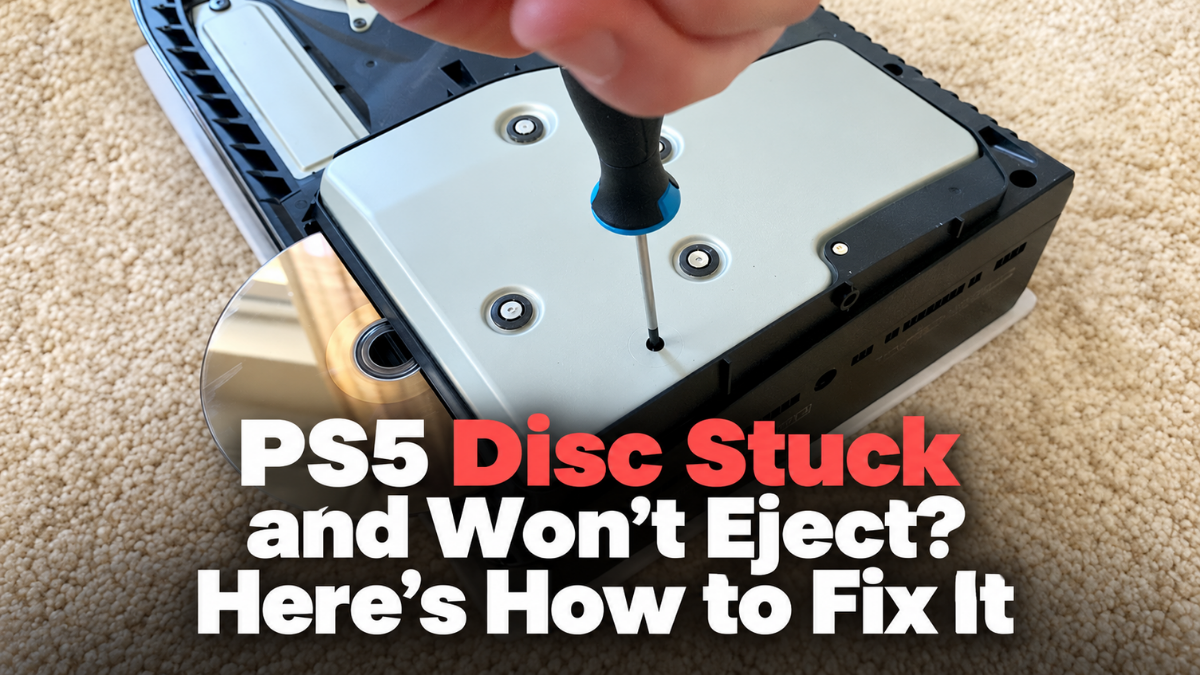
You’ve finished playing your favourite PlayStation 5 game and pressed the eject button, expecting the disc to slide out. Instead, nothing happens. You press it again, hear an unusual clicking sound or notice that the console no longer responds to the eject command. Your game is now trapped inside the PS5.
A PS5 disc stuck and won’t eject problem can happen because of a temporary system glitch, a problem with the disc-ejection mechanism or damage inside the optical drive. Sometimes the console recognises the disc but refuses to release it, while other times the eject button appears completely unresponsive.
Fortunately, a stuck disc does not always mean that the entire disc drive needs replacing. Sony provides an official manual-ejection procedure for supported PS5 consoles, and several simpler checks are worth trying first.
In this Gadgets N Repair guide, we’ll explain why a PS5 disc may become stuck, how to remove it safely and when professional PS5 repair in St Helens may be necessary.
Why Is My PS5 Disc Stuck and Not Ejecting?
If your PS5 won’t eject a disc, the problem may involve the console’s software, eject controls or the disc-drive mechanism. The exact cause depends on what happens when you try to remove the disc.
Some users hear the normal eject sound but the disc does not appear. Others hear repeated clicking or grinding noises, while some find that neither the controller nor the physical eject button works.
1. A Temporary Software Glitch
Your PlayStation 5 uses software to manage several console functions, including interactions with the disc drive. Occasionally, an unexpected error may prevent an eject command from completing normally.
If the disc drive is otherwise healthy, restarting the console may restore normal operation. However, repeated failures should not automatically be treated as software problems.
2. A Faulty Disc-Ejection Mechanism
The PS5’s optical drive contains mechanical components that move discs into and out of the console.
If part of this mechanism becomes damaged, misaligned or obstructed, the console may struggle to release an inserted disc. You might hear clicking sounds, repeated attempts to eject or an unusual motor noise.
These symptoms can indicate a mechanical fault, although a physical inspection is needed to determine the cause.
3. A Problem With the Eject Button
If pressing the physical eject button produces no response, the problem may involve the button, console state or internal disc-drive control.
The correct location of the eject button depends on your PS5 model.
A console that is switched off or unresponsive will not behave like one running normally, so check its power status before assuming that the button is damaged.
4. A Damaged or Misaligned Disc
A damaged or incorrectly positioned disc may interfere with the normal loading and ejection process.
Although discs are designed to move through the drive mechanism in a controlled way, physical damage or a drive fault can occasionally prevent smooth movement. Do not insert another disc or attempt to force the trapped one out.
5. Internal Disc-Drive Damage
If the console has suffered a fall, impact or previous unsuccessful repair, the optical drive may have sustained physical damage.
Persistent grinding noises, repeated failed ejection attempts or problems recognising discs can indicate that the mechanism requires inspection.
A professional game console repair in St Helens service can investigate these symptoms before recommending replacement parts.
How to Fix a PS5 Disc That Won’t Eject
Before attempting manual ejection, try the following straightforward troubleshooting steps.
Start with the methods that do not require removing any console covers.
Method 1: Eject the Disc Using the PS5 Home Screen
If your PS5 is running normally and you can navigate its menus, try ejecting the disc through the console interface.
- Turn on the PS5 and sign in to your usual profile.
- Open the Games home screen.
- Locate the tile for the inserted disc.
- Highlight the game without opening it.
- Press the Options button on your DualSense controller.
- Select Eject Disc, if the option is available.
- Check whether the disc comes out.
If the option is missing or the console does not respond, do not repeatedly send eject commands.
Move on to the next method.
When this method helps: The physical eject button is not responding, but the disc drive can still respond to commands from the console interface.
Method 2: Use the Physical Eject Button
PS5 consoles with a disc drive have a dedicated eject button.
On compatible disc-equipped models, locate the eject button on the front of the console, close to the power control. Make sure you identify the correct button. Its position varies between the original PS5 and newer chassis designs.
With the console operating normally, press the eject button once and allow the drive time to respond. If the disc starts coming out, let the mechanism release it rather than pulling against the motor. If nothing happens, avoid repeatedly pressing the button.
For model-specific button locations, consult Sony’s official PS5 console button guide.
When this method helps: The disc is recognised and the drive’s ejection mechanism remains functional.
Method 3: Restart the PS5 and Try Again
A temporary software problem may occasionally interrupt disc ejection.
If the PS5 is responding normally, restart it through the console menu.
- Press the PS button on the controller.
- Open the Power controls.
- Select Restart PS5.
- Allow the console to restart completely.
- Try ejecting the disc again.
Do not disconnect the power cable while the console is actively shutting down, updating or writing data. If the console is frozen, follow Sony’s applicable power troubleshooting instructions rather than immediately disconnecting it.
Once the system is operating normally, try the physical eject button or the console’s eject option. If the disc remains trapped, a manual-ejection procedure may be necessary.
How to Manually Eject a Stuck Disc From a PS5
Sony provides an official manual disc-ejection procedure for compatible PS5 disc drives.
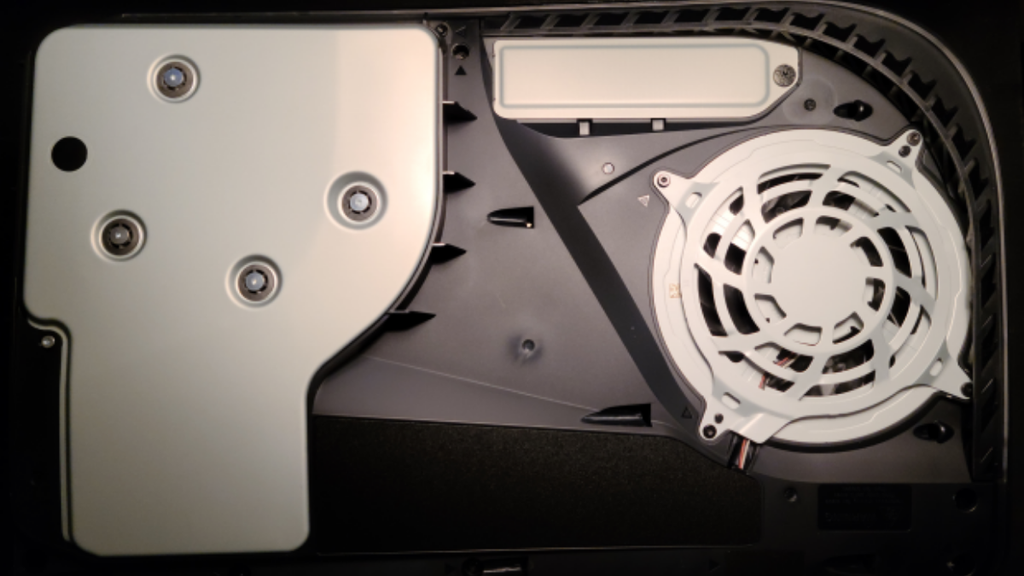
This method involves accessing a dedicated manual-eject screw beneath the appropriate console cover.
Important: The instructions below describe the general process used by Sony. The correct cover position, illustrations and access procedure depend on your PS5 model. Use Sony’s model-specific instructions before proceeding, especially on PS5 Slim and PS5 Pro configurations.
What You’ll Need
For the original PS5 manual-ejection procedure, Sony specifies:
- A clean, well-lit working area.
- A stable table.
- A soft cloth to protect the console’s exterior.
- A No. 1 Phillips or cross-head screwdriver.
- A small torch, if additional light is needed.
Do not attempt this procedure while the console is connected to electricity.
Step 1: Turn Off the PS5 Completely
Press and hold the power button for approximately three seconds to turn off the console, following Sony’s instructions.
Wait for the console to shut down fully and for the power indicator to turn off. Disconnect the power cable and all other connected cables and accessories.
Allow the console to cool before handling its covers. Do not perform manual ejection while the PS5 is in Rest Mode.
Step 2: Place the Console on a Soft, Flat Surface
Place a clean cloth on a stable table and position the console carefully.
Remove the stand, base or relevant support as directed by Sony for your model.
On the original PS5 disc model, Sony’s instructions position the console with the disc slot on the left and the appropriate cover facing upwards for removal.
Newer models have different cover arrangements, so verify the correct orientation using the official PlayStation instructions.
Step 3: Remove the Correct Exterior Cover
Follow Sony’s model-specific cover-removal procedure. For the original PS5, the relevant exterior cover can be lifted away using the grip and movement shown in Sony’s illustrated guide. Do not use metal tools to lever the plastic cover away.
Avoid pulling on internal components or removing unrelated screws. If the cover does not release as described in the official instructions, stop rather than applying excessive force.
Never switch on or use the console while its cover is removed.
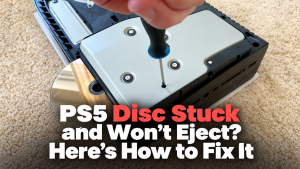
Step 4: Locate the Manual-Eject Screw
On the original PS5 disc-drive design, Sony identifies the manual-eject screw near the optical drive. It may be concealed beneath a small piece of black plastic film. Some newer console versions do not have this film.
Use a torch to identify the location. Do not turn a screw merely because it appears close to the disc drive.
If the correct manual-eject screw cannot be clearly identified from Sony’s model-specific diagram, seek professional help instead.
Step 5: Turn the Manual-Eject Screw Carefully
For Sony’s documented original PS5 procedure, insert the appropriate cross-head screwdriver into the manual-eject screw. Turn the screw clockwise as instructed by Sony.
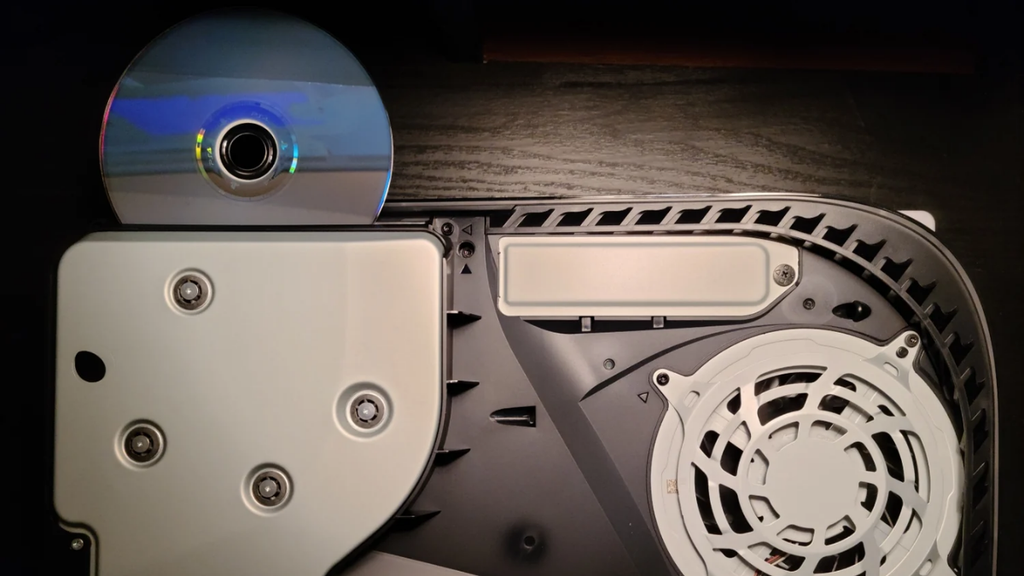
Continue carefully until the disc becomes almost completely visible. Do not force the mechanism if the screw is jammed, unusually resistant or appears damaged.
If the disc does not move normally, stop. For newer or detachable disc-drive versions, use the applicable official guide rather than assuming the original PS5 screw position and procedure are identical.
Step 6: Remove the Disc Gently
When the disc has been released far enough, remove it gently by its edges. Do not forcibly pull it from the optical drive.
Avoid touching the disc’s readable surface where possible. Once removed, inspect the disc for visible scratches, cracks or unusual damage. If the disc is bent, cracked or otherwise damaged, do not reinsert it.
Step 7: Replace the Cover and Reconnect the Console
Reattach the console’s exterior cover according to Sony’s instructions. Make sure it is properly aligned and secured before reconnecting the power cable.
Reinstall the stand or supporting feet as appropriate for your model. Reconnect the cables, power on the console and check whether it starts normally. Do not immediately insert another valuable disc if you suspect the drive mechanism is damaged. If the console continues making grinding sounds or fails to handle discs correctly, arrange a professional assessment.
Can You Manually Eject a Disc From PS5 Slim or PS5 Pro?
The PlayStation 5 family includes several hardware configurations, and not all models have the same disc-drive arrangement.
The original disc-equipped PS5 has an integrated optical drive, while compatible newer models can use a detachable disc-drive unit.
The PS5 Pro does not include a disc drive as standard; compatible models can use Sony’s separately available drive accessory.
| PS5 model | Disc-drive arrangement | What to check |
|---|---|---|
| Original PS5 Disc Edition | Built-in disc drive | Original PS5 manual-eject instructions |
| Original PS5 Digital Edition | No built-in disc drive | No disc-ejection process applies |
| PS5 Slim with disc drive | Detachable drive configuration | Instructions for the appropriate model and drive |
| PS5 Slim Digital Edition | Disc drive optional on compatible models | Confirm whether a drive is installed |
| PS5 Pro | Compatible disc drive sold separately | Model-specific Sony documentation |
If you own a newer PS5 console, check the model number before removing any cover. Sony provides separate cover-removal and disc-drive installation information for the relevant model groups.
Do not attempt to detach, dismantle or force open the drive mechanism while a disc remains trapped unless you are following a documented procedure for that exact configuration.
PS5 Disc Stuck but the Eject Button Makes a Noise
If your PlayStation 5 makes a sound when you press eject but the disc does not move, the drive may be attempting to operate without completing the process.
The sound itself can provide useful clues. A normal brief motor sound with no disc movement may indicate that the ejection mechanism is struggling.
Repeated clicking, grinding or unusual mechanical noises can point towards a drive-related problem. However, sound alone cannot confirm that a particular motor or gear has failed.
Avoid repeatedly pressing eject, as continued attempts could worsen an existing mechanical problem. If the normal eject methods fail, use Sony’s supported manual-eject instructions or arrange professional PS5 disc drive repair assessment.
What If the PS5 Manual Eject Screw Won’t Turn?
The manual-eject screw should not require aggressive force.
If it appears stuck, stripped or unusually difficult to turn, stop the procedure. Make sure you have identified the correct screw and are using the proper screwdriver.
Do not substitute oversized tools, use powered screwdrivers or apply excessive pressure. A damaged screw or jammed mechanism could make removal more difficult and may damage the optical drive.
If the screw cannot be operated safely, professional repair is preferable to forcing it. At Gadgets N Repair, customers experiencing console disc-drive problems can enquire about available assessment and repair options.
Why Does My PS5 Keep Getting Discs Stuck?
A single disc-ejection problem may occur because of a temporary fault. However, repeated failures suggest that the underlying issue has not been resolved.
Possible causes include wear or damage affecting the disc-loading mechanism, a damaged optical drive or an issue introduced by an earlier impact or repair.
Repeated problems may also occur alongside disc-reading errors, unusual mechanical sounds or difficulty accepting discs. If a disc has already become trapped more than once, avoid repeatedly testing the console with valuable games.
A technician should examine the mechanism and determine whether cleaning, adjustment or component repair is appropriate.
PS5 Disc Stuck vs PS5 Not Reading Discs: What’s the Difference?
A stuck disc and an unreadable disc are related to the optical drive, but they are not necessarily the same fault.
| Symptom | Possible problem |
|---|---|
| Disc won’t come out | Ejection mechanism or control problem |
| Disc enters but isn’t recognised | Disc, optical reading system or drive issue |
| Console makes clicking sounds during ejection | Possible mechanical obstruction or fault |
| Disc comes out but won’t load again | Loading mechanism problem |
| Disc is recognised but game won’t install | Disc, software, storage or reading problem |
| Multiple discs become stuck | Recurring drive-related issue |
If your PS5 can eject discs but repeatedly fails to recognise them, focus on disc-reading troubleshooting instead of manual-ejection procedures.
Sony recommends checking the disc’s condition and testing other compatible discs when investigating reading errors.
For broader optical-drive faults, our game console repair services in St Helens can be a relevant next step.
Will Manually Ejecting a PS5 Disc Delete Saved Games?
Normally, no. A correctly completed physical disc-ejection procedure does not involve erasing the console’s stored game data. PS5 saved games and installed content are stored separately from the game disc.
However, a console experiencing a wider hardware fault may have additional problems, so data preservation cannot be guaranteed during every repair.
Avoid factory resets or system software reinstallation merely to solve a stuck disc. Sony’s Reset PS5 and system software reinstallation options can erase user data. If you are preparing the console for repair, check whether your saved data is backed up where possible.
What Not to Do When a PS5 Disc Is Stuck
Trying to remove a trapped disc too aggressively can turn a manageable fault into a more expensive repair. Never insert a knife, metal ruler, credit card or another object into the disc slot to pry the disc out.
Do not shake the console, strike its casing or attempt to pull the disc out while the drive mechanism is holding it. Avoid inserting a second disc to push the trapped disc backwards. Never open the console while it remains connected to electricity.
If you attempt manual ejection, follow the correct Sony instructions and stop when the mechanism resists normal movement. When the disc is unusually difficult to release, professional assessment is the safer option.
When Does a Stuck PS5 Disc Need Professional Repair?
Professional help may be necessary when the ordinary eject button and on-screen eject command do not work, and the supported manual-ejection procedure cannot be completed safely.
You should also seek assistance if the disc drive makes grinding noises, repeatedly traps discs, fails to recognise games or shows signs of physical damage.
A technician may inspect the loading mechanism, drive components and relevant connections to determine the cause. The correct repair depends on whether the fault is mechanical, electrical or associated with another part of the console.
Not every stuck-disc problem requires a complete drive replacement. Gadgets N Repair provides PlayStation repair in St Helens, including enquiries about PS5 console hardware and disc-drive problems.
How Much Does PS5 Disc Drive Repair Cost in the UK?
The cost of PS5 disc-drive repair varies according to the console model and the underlying fault.
If the problem can be resolved through a supported ejection procedure without replacing parts, the work may be relatively straightforward.
However, damaged loading components, drive electronics or more extensive mechanical faults can require additional labour or replacement parts.
| Type of PS5 problem | Potential repair requirement |
|---|---|
| Temporary eject-control problem | Software or console troubleshooting |
| Disc trapped but drive otherwise functional | Safe manual ejection and testing |
| Damaged loading mechanism | Mechanical repair or component replacement |
| Repeated grinding noises | Optical-drive inspection |
| Damaged or malfunctioning disc drive | Model-specific repair or replacement assessment |
| Multiple disc-reading and ejection faults | Comprehensive optical-drive diagnosis |
There is no reliable single UK repair price for every stuck-disc fault.
Before accepting a quotation, ask whether it includes diagnosis, disc removal, replacement parts, labour and the relevant repair warranty.
If your PS5 still has manufacturer or retailer warranty coverage, check those options before authorising a third-party repair.
How to Prevent PS5 Discs From Getting Stuck
Although hardware faults can occur unexpectedly, sensible console care may reduce the risk of disc-loading problems.
Keep the console on a stable surface and use the correct stand or supporting feet for your model. Avoid moving or shaking the console while a disc is being read or ejected.
Handle game discs by their edges and avoid inserting visibly cracked or damaged discs. If a disc is dirty, clean it using a suitable soft, lint-free cloth. Sony recommends wiping from the centre towards the outer edge.
Keep the surrounding area free from excessive dust and avoid placing objects where they could obstruct the disc slot. If your PS5 begins making unusual noises during disc loading or ejection, investigate the problem before repeatedly inserting more games.
PS5 Disc Drive and Game Console Repair in St Helens
A stuck disc can be frustrating, particularly when an expensive game is trapped inside your PlayStation 5.
If ordinary ejection methods fail or your console develops repeated disc-drive problems, a proper diagnosis is preferable to forcing the disc out.
At Gadgets N Repair, we provide PS5 and game console repair in St Helens, including enquiries involving disc-drive faults, console hardware problems and related malfunctions.
When contacting our team, tell us which PS5 model you own, whether the console recognises the disc and whether the eject mechanism makes any unusual sounds.
If you have already attempted manual ejection, mention that as well. Explore our game console repair services or contact Gadgets N Repair to discuss an inspection and available repair options.
Frequently Asked Questions
Why is my PS5 disc stuck and won’t eject?
A PS5 disc may become stuck because of a temporary software issue, an unresponsive eject control or a mechanical problem inside the optical drive. Try the normal eject methods first, then follow Sony’s model-specific manual-ejection guidance if necessary.
How do I manually eject a stuck disc from my PS5?
Sony provides a manual-ejection procedure involving the appropriate console cover and a dedicated eject screw. For the original PS5 disc model, the process requires switching off and unplugging the console before accessing the screw. Follow the official model-specific instructions.
Can I eject a PS5 disc using the controller?
Yes, when the console is operating normally and the relevant disc option is available. Highlight the inserted disc’s game tile, press the Options button and select Eject Disc.
Why does my PS5 beep but not eject the disc?
The console may be responding to the eject command without successfully releasing the disc. Possible causes include a temporary control problem or a fault affecting the drive mechanism. Repeated clicking or grinding sounds warrant further inspection.
Does the PS5 Slim have a manual disc eject option?
Disc-equipped PS5 Slim configurations have model-specific disc-drive hardware. Check Sony’s instructions for the exact console and drive before attempting manual ejection. Do not assume the original PS5 procedure is identical.
Can a PS5 Pro get a disc stuck?
A PS5 Pro can use a compatible separately available disc-drive accessory. If a disc becomes trapped in an installed drive, consult Sony’s instructions for that model and drive configuration.
Will manually removing a PS5 disc damage the console?
Following Sony’s supported procedure carefully can allow a trapped disc to be removed. However, forcing the disc, turning the wrong screw or handling internal parts incorrectly can cause damage. Stop if the procedure does not work normally.
Why does my PS5 keep trapping game discs?
Repeatedly stuck discs may indicate an unresolved problem with the loading mechanism or another part of the optical drive. A professional inspection can help identify the cause before further discs become damaged.
Will ejecting a stuck PS5 disc erase my saved games?
Normally, no. Physical disc ejection does not require erasing console data. However, avoid factory resets or system software reinstallation simply to remove a stuck disc, as certain reset procedures delete user information.
Can Gadgets N Repair help with a stuck PS5 disc?
Gadgets N Repair provides game console repair services in St Helens. Contact the team with your PS5 model and symptoms to enquire about available diagnostic and disc-drive repair options.
Final Thoughts
If your PS5 disc is stuck and won’t eject, there is no need to start pulling at the disc slot or opening the console immediately.
Begin with the normal on-screen eject command, the physical eject button and a safe restart. If these methods fail, Sony provides an official manual-ejection procedure for supported disc-drive models.
Always switch off and disconnect the console before accessing the manual-eject mechanism, and use instructions that match your exact PS5 model.
If the drive makes unusual noises, repeatedly traps discs or cannot release the game safely, stop troubleshooting and seek professional assistance. For PS5 disc-drive problems and game console repair in St Helens, contact Gadgets N Repair to discuss the fault and available repair options.